Montessori 3-part cards: what they are, how to make them and how to use them
Three-part cards are the classic Montessori vocabulary material. Here is what they are, which age they suit, how to make a set yourself and how to use it, plus a free set to print.
What are 3-part cards?
A set has three pieces for each word: a control card with the picture and its name, a picture card with no name, and a separate label with only the name.
The child matches the picture cards to the labels, then checks the result against the control cards. Because the control card shows the right answer, the child can correct mistakes without an adult. Montessori called this control of error.
You will also see them called nomenclature cards or classified cards.
Which age are they for?
- Picture to picture, using the control cards: usually from about two and a half to three.
- Labels: once the child starts reading, most often between four and six.
- Older children: "parts of" cards (parts of a flower, a leaf, a fish) and sets for nature, geography or history.
Free set to print
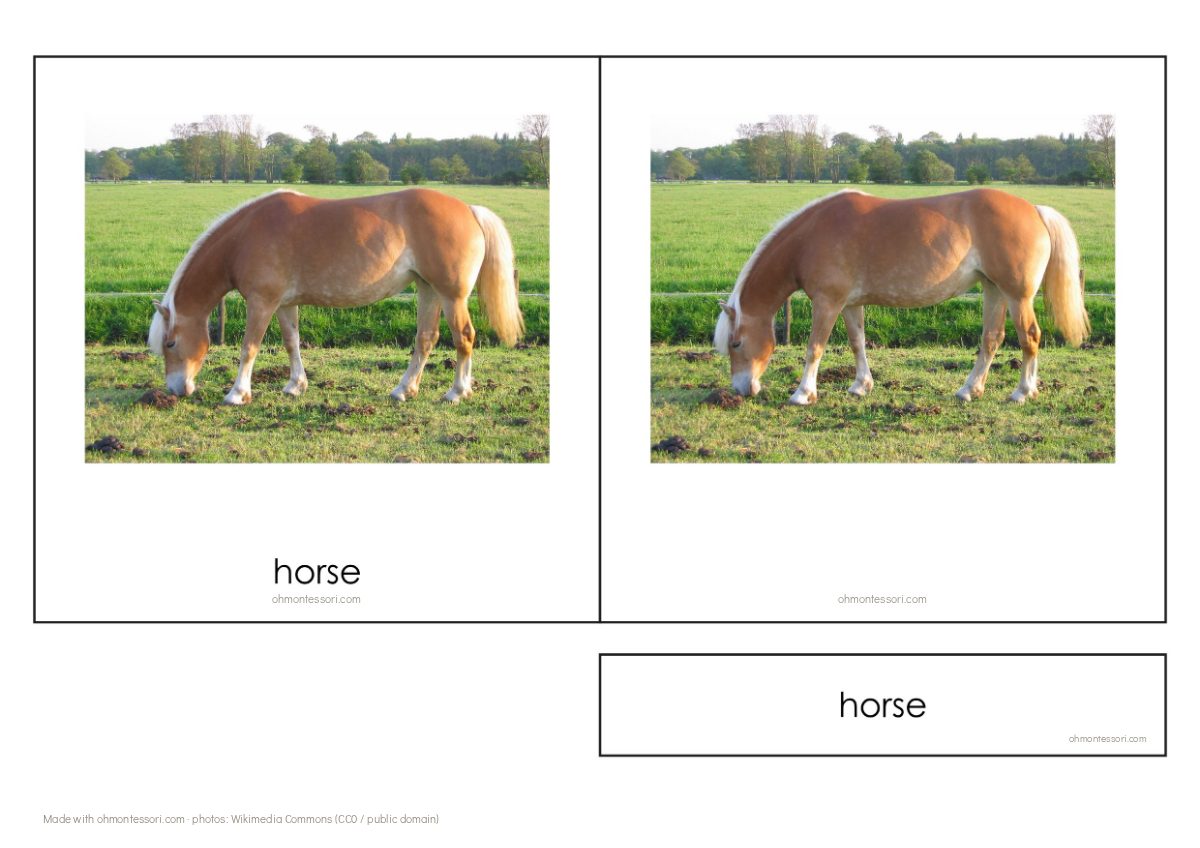
Photos from Wikimedia Commons (CC0 / public domain) — cow: Roshan Patel, horse: Paula Jantunen, pig: Johan Spaedtke, hen: Pedalito.


Every card in this free set carries a small ohmontessori.com line. Cards you make yourself in the maker with a subscription or a 7-day pass have no mark at all.
Kinds of 3-part cards
- Vocabulary: objects, animals, fruit, one word per card.
- "Parts of" nomenclature cards: the same picture on every card, with a different part highlighted each time.
- Bilingual cards: the same pictures with labels in a second language.
- Classification sets: pictures from one group, such as mammals, birds or fish, for sorting.
What you need
- Six to ten pictures on one topic. Photos of real things work better than drawings, especially for children under six.
- A printer and A4 paper — heavier paper or card if you have it.
- Scissors or a paper trimmer. A laminator is optional.
Step by step
- Choose one narrow topic: fruit in our kitchen, animals on grandma's farm, tools in the garage.
- Take or collect the pictures. Keep the background plain and show one object per picture.
- Write each name in lowercase, the way the child will meet it in books.
- Lay out the three parts. Every card in the set must be the same size, so that only the picture and the word differ.
- Print at 100% scale, cut, and keep the set in its own envelope or small box.
How to present them
Start with the picture cards only. Name each one, and let the child name them back over a few days. This spoken stage matters more than the matching.
For a child who is not reading yet, lay out the control cards and let them match the picture cards to them — picture to picture.
For a child who is starting to read, lay out the picture cards, read the labels together and place each under its picture. Then bring out the control cards to check.
Six cards at a time is plenty. Swap the set when interest fades.
Common mistakes
- Too many cards at once. Start with five or six.
- Mixed styles: a photo next to a cartoon next to a drawing. Keep one style in a set.
- Using cards instead of the real thing. If you can put a real apple on the table, do that first.
Template, ready-made set or maker?
Ready-made PDF sets are convenient when the topic is a common one. The pictures, words and font are chosen for you.
A Word or Canva template gives you more freedom, but you crop the photos, line up the frames and size the labels by hand for every card.
The OhMontessori 3-Part Card Maker works like a template that does the layout for you: add a photo, type the word, and the control card, picture card and label are placed on an A4 sheet.
Questions
Where can I get free 3-part cards to print?
The farm animals set above is free (cow, horse, pig, hen). For any other topic you can make a set from your own photos with the maker.
Do I need to laminate them?
No, but laminated cards last much longer with daily use. Cut them out after laminating for clean edges.
How should I store them?
Each set in its own envelope, pouch or small box, with the control cards on top. Keep two or three sets on the shelf at a time and rotate them every few weeks.
Which font should the labels use?
A simple one with round, single-storey a and g, like the letters in children's books, in lowercase.
Tools for this
The 3-Part Card Maker lays out all three parts for you — upload the pictures, type the names, download the PDF.